How to Solve DTF Printer Nozzle Clogging
By Jingtong Intelligent Technology
April 23rd, 2026

DTF printing is becoming more popular in the textile industry. However, one of the most common problems users face is nozzle clogging. This issue can lead to poor print quality, missing lines, or even complete printing failure.In this guide, we will explain the causes of nozzle clogging and provide simple solutions to fix and prevent it.1. What Causes DTF Nozzle Clogging?Understanding the causes is the first step to solving the problem.1.1 Ink DryingIf the printer is not used for a long time, ink can dry on the nozzle surface and block ink flow. 1.2 Poor Ink Quality or ImpuritiesLow-quality or expired ink may contain particles that clog the tiny nozzles. 1.3 Lack of MaintenanceWithout regular cleaning, ink residue builds up and blocks the printhead. 1.4 Environment IssuesLow humidity or high temperature can cause ink to dry quickly and clog the nozzle. 1.5 White Ink SedimentationWhite ink contains heavy pigments, which can settle and block the ink channels if not circulated properly. 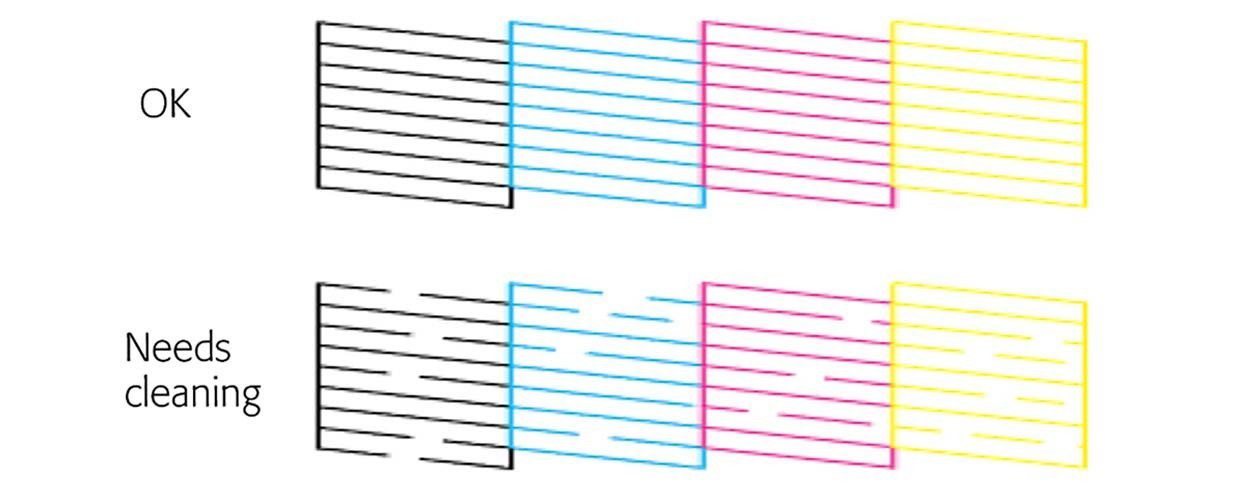 2. How to Fix DTF Nozzle CloggingIf your printer is already clogged, follow these steps:Step 1: Run Nozzle CheckPrint a test pattern to identify which nozzles are blocked.Step 2: Perform Head CleaningUse the printer software to run automatic cleaning cycles.Step 3: Manual Cleaning* Use cleaning solution* Wipe the printhead gently* Avoid scratching the nozzle surfaceStep 4: Check Ink SystemMake sure:* Ink tubes are not bent* No air bubbles inside* Ink supply is stable Step 5: Restore Ink FlowIf necessary, use a syringe to draw ink through the system to remove blockages.3. How to Prevent Nozzle CloggingPrevention is always easier than repair.3.1 Print RegularlyUse the printer every day or every few days to keep ink flowing.3.2 Maintain Proper HumidityKeep humidity between 40%–60% to prevent ink drying. 3.3 Use High-Quality InkAlways choose reliable DTF ink and store it properly.3.4 Shake White Ink DailyThis prevents pigment settling and keeps ink smooth.3.5 Clean Printer Regularly* Clean wiper blade* Check capping station* Run maintenance cycles3.6 Avoid Long Idle TimeIf the printer will not be used, perform proper shutdown maintenance.4. ConclusionDTF nozzle clogging is a common issue, but it can be easily managed with proper care.By:* using good ink* maintaining the printer* controlling the environment
You can significantly reduce clogging problems and extend the life of your printhead.FAQ About DTF Nozzle Clogging1. Why does my DTF printer nozzle keep clogging?DTF nozzle clogging is usually caused by dried ink, poor ink quality, lack of maintenance, or improper environmental conditions such as low humidity.2. How do I fix a clogged DTF printhead quickly?You can fix it by running automatic cleaning cycles, followed by manual cleaning with a proper cleaning solution. If needed, check the ink system and remove air bubbles.3. Can a clogged DTF nozzle be fully recovered?In most cases, yes. Light or moderate clogging can be fixed through cleaning. However, severe or long-term clogging may permanently damage the printhead.4. How often should I clean my DTF printer?It is recommended to perform light cleaning daily and deep cleaning when necessary, depending on usage frequency.5. What happens if I don’t fix nozzle clogging?Ignoring clogging can lead to poor print quality, increased ink waste, and eventually permanent damage to the printhead.6. Does white ink cause more clogging?Yes. White ink contains heavy pigments that can settle easily, making it more likely to clog if not properly circulated or shaken.
Previous
DTF vs DTG Printing: What’s the Difference and Which One Should You Choose?
Read More
Next
How to Adjust UV LED Printing Ink Thickness for Better Print Quality and Adhesion
Read More


